Introduction
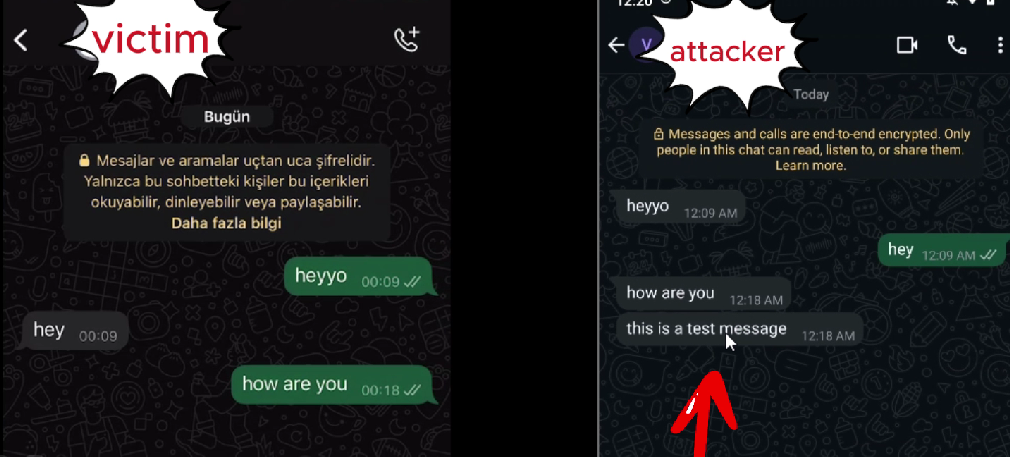
In this article, we will explore the technical mechanism behind adding a fake WhatsApp message directly into the msgstore.db SQLite database. This manipulation allows a message to appear as if it was sent by the other party, even though it was never actually transmitted. We will dissect the structure of WhatsApp's message storage and explain how modifying specific fields can trick the app into displaying a fabricated message as legitimate.
WhatsApp Message Storage: The Basics
WhatsApp stores all user messages in a local SQLite database called msgstore.db. This database contains several tables, but the most important one for our purpose is the message table.
Each row in the message table represents a single message, with columns defining its metadata, including sender, timestamps, status, and content.
The Key Columns in the message Table
Here are some of the most relevant columns involved in message manipulation:
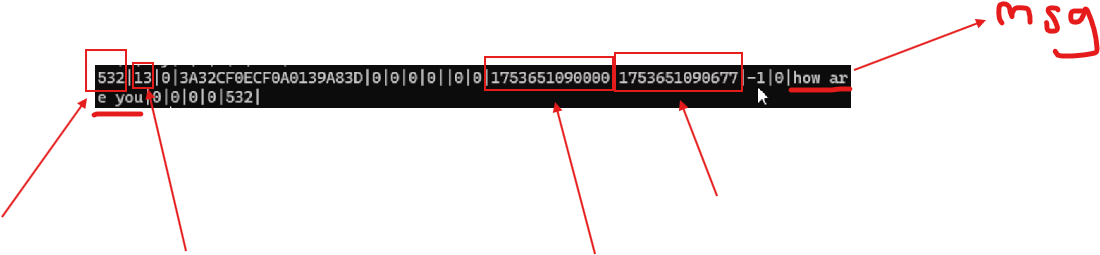
ColumnDescription _id The primary key for the message, auto-incremented for each new message chat_row_id Refers to the conversation this message belongs to from_me Indicates the direction of the message: 1 if sent from the device, 0 if received key_id A unique identifier for the message, usually a hash timestamp The time the message was sent (Unix time in milliseconds) received_timestamp The time the message was received text_data The actual message content status Indicates the delivery/read status (e.g., 13 for "seen") sort_id Determines the display order of the message
Why Increment the _id?
When manually inserting a new row into the message table, the _id field must be unique. Since it is typically auto-incremented, you must ensure that your inserted _id is greater than the current maximum in the table.
For example, if the last message has _id = 532, you must insert your fabricated message with _id = 533. This maintains database integrity and ensures the message is treated as the newest entry.
Additionally, sort_id should match the _id if you want the message to appear at the correct position in the chat. Otherwise, WhatsApp may misplace or ignore it during display.
The Manipulation Process
- Select an existing message from the
messagetable. Note itschat_row_id,timestamp, andreceived_timestamp. - Prepare an INSERT query with:
- A new
_idvalue (incremented by one) - The same
chat_row_idto ensure it appears in the same conversation from_me = 0to make it appear as though the message came from the other person- A realistic
key_idstring - Copied or adjusted timestamps to match the message flow
- Your custom
text_data(e.g.,'this is a test message')
- A new
- Execute the query using
sqlite3or another database editor while the app is closed. - Restart WhatsApp, and the message will be visible as part of the conversation history.
What Makes This Work?
PoC link: github.com/0x6rss/whatsapp-message-manipulation
The core reason this manipulation works is because WhatsApp does not validate message integrity via external checks when reading from msgstore.db. The application simply loads messages from the database and renders them based on their metadata.
There is no digital signature, checksum, or cryptographic verification on the plaintext message level in the local database. This makes it possible to insert fake messages that appear completely legitimate to the user.
Limitations and Forensic Considerations
While the WhatsApp UI will display the manipulated message normally, a forensic investigator could potentially identify inconsistencies by:
- Cross-referencing
key_idvalues with the encryptedcrypt14backup files - Detecting unnatural timestamp sequences
- Comparing message metadata with server-side backups (if available)
However, for typical device-level inspection, this type of manipulation is not readily detectable without deeper forensic tools.
Conclusion
Understanding the structure of WhatsApp's local message storage enables targeted manipulations such as fake message injection. By correctly modifying fields like _id, from_me, and timestamp, one can craft believable fake messages that seamlessly integrate into chat history.
